Connected NTP Clock
Connected NTP Clock System (Smart Clock ESP8266)Short descriptionStandalone embedded connected alarm clock solution based on an ESP8266 microcontroller. It combines ultra-precise time synchronization over the Inter...
Connected NTP Clock System (Smart Clock ESP8266)
Short description
Standalone embedded connected alarm clock solution based on an ESP8266 microcontroller. It combines ultra-precise time synchronization over the Internet via the NTP protocol, local time backup on a real-time clock (RTC DS1302), a 7-segment display (TM1637) and a smart repeating alarm cycle (5 minutes of ringing / 5 minutes of pause) until manually switched off.
Detailed description
1. Context
In everyday life, punctuality relies on reliable timekeeping tools. Traditional electronic alarm clocks often suffer from clock drift (losing or gaining a few minutes per month) and require tedious manual adjustments during time changes or power outages. The integration of IoT technologies and Wi-Fi now makes it possible to create autonomous everyday objects that are always on the exact time and equipped with advanced ergonomics.
2. Problem solved
This project solves two major limitations of conventional alarm clocks:
Time drift and loss of time: Thanks to the dual network (NTP) and hardware (RTC with backup battery) layers, the alarm clock guarantees accuracy to the second, even after a power outage or a restart.
Accidental alarm deactivation: Most alarm clocks stop permanently after one minute of ringing. This project implements a persistence logic (an endless cycle of 5 min of sound/visual alarm alternating with 5 min of silence) that forces the user to get up and press the STOP button.
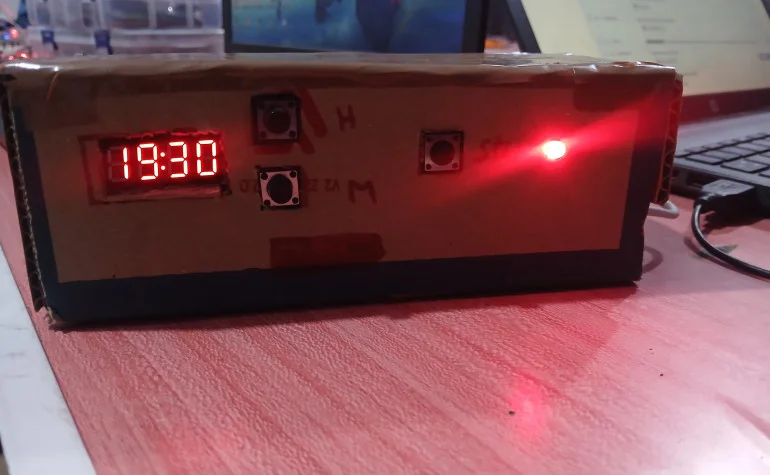
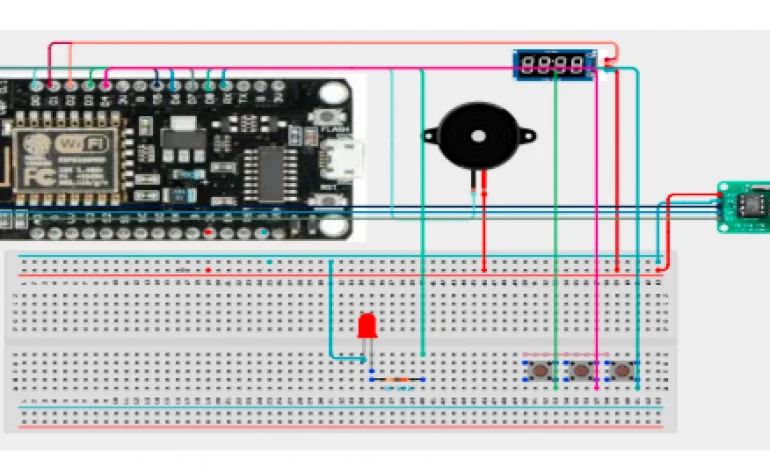
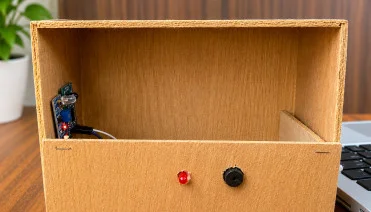
The system relies on an ESP8266 microcontroller housed in a custom enclosure. It connects over Wi-Fi to NTP time servers to automatically update a DS1302 RTC clock module. The time is displayed continuously on a 4-digit TM1637 screen. The user has two buttons to set the alarm time and a dedicated STOP button. A buzzer and a single LED provide a multi-frequency visual and audible alert.
4. General operation
Initialization & Sync : On startup, the ESP8266 connects to the Wi-Fi network, queries an NTP server (e.g. pool.ntp.org) to obtain the exact time, then saves this timestamp in the DS1302 RTC module. A resynchronization takes place automatically every 6 hours.
Normal Mode : The TM1637 screen displays the current time (with a blinking colon). Between the 50th and 55th second of each minute, the screen briefly switches to display the date (Day/Month). The red LED stays on as a fixed status indicator.
Alarm Setting : Pressing the HOUR (D3) or MINUTE (D4) buttons sets the wake-up time, which is displayed for 2 seconds on the screen.
Alarm Mode (Infinite repetition) : At the programmed time, the alarm goes off. A timed 10-minute cycle starts.
Phase 1 (0 to 5 min) : The buzzer plays an alternating two-tone melody (800 Hz / 1200 Hz) in sync with the blinking of the red LED.
Phase 2 (5 to 10 min) : Silent 5-minute pause, the LED goes back to steady.
Loop : This cycle restarts from zero as long as the STOP button (GPIO 3 / RX) is not pressed.
5. Main features
Automatic NTP Synchronization : Automatic time setting over the Internet without any initial manual adjustment.
Standalone Real-Time Clock (RTC) : Keeps the time thanks to the DS1302 chip, reducing Wi-Fi access and enabling offline operation.
Multi-Function Dynamic Display : automatic switching between the time display (HH:MM) and the short date (DD:MM).
Persistent Alarm Management : Smart alarm paced at a 50% duty cycle (5 min ON / 5 min OFF) to guarantee that the user wakes up.
Multi-frequency Audible & Visual Alert: Alternating buzzer tones and blinking of the status LED while ringing.
Secure Hardware Architecture : Pin choices optimized to avoid conflicts at ESP8266 startup (STOP button assigned to the RX pin).
6. Technologies used
Hardware
Software and Protocols
- Language and IDE: Embedded C++ in the Arduino IDE
- Key libraries: ESP8266WiFi.h (Wi-Fi network layer management).
time.h (NTP protocol handling and conversion of time structures).
RtcDS1302.h (3-wire communication driver with the external clock).
TM1637Display.h (2-wire serial protocol control of the display panel).
- Network protocol : UDP / NTP (Network Time Protocol) for retrieving UNIX timestamps.
- Cloud platform: IoT architecture Youpilab IoT dedicated to receiving and storing variables.
Applications
Residential & Home Automation Use : Standalone backup alarm clock for the bedroom with no dependence on a mobile app.
Education & Prototyping (Maker) : Excellent support project for learning microcontrollers (ESP8266), non-blocking timing with millis(), bus communication (RTC, TM1637) and network protocols (NTP).
Academic Projects & Competitions : Working demonstrator covering interface design, electronic wiring and the fabrication of the structure/enclosure.

No comments yet. Be the first!